
Core Web Vitals: The Non-Technical Business Owner's Guide to Website Speed, Google Rankings, and More Sales
Your website has three seconds to impress.
That's the window; just three seconds between the moment someone clicks your link in Google and the moment they decide whether to stay or leave. If your page hasn't loaded by then, more than half your visitors are already gone.
Google's research shows that as page load time increases from one second to three seconds, the probability of a visitor bouncing increases by 32 percent. Stretch that to five seconds and the bounce probability jumps 90 percent. At ten seconds, you've lost 123 percent more visitors than a one-second site.
This doesn't mean your site is doomed if it's slow though. Fortunately, Google tells you exactly what's wrong and we can use those clues to provide fixes. They've created a system called Core Web Vitals, which are three specific measurements that grade your website's speed, responsiveness, and visual stability. And in 2026, those grades directly affect where your site appears in search results too.
This guide is for you: the business owner who doesn't write code, but does care about showing up on Google, converting visitors into customers, and not hemorrhaging money to a slow website.
What Are Core Web Vitals?
Core Web Vitals are three performance metrics that Google uses to evaluate how real users experience your website. They were introduced as an official Google ranking factor in June 2021 as part of the Page Experience Update, and they've only grown more important since.
Think of them as a report card for your website's user experience. Not what your site looks like, but what it feels like to use. Does it load fast? Does it respond when someone clicks a button? Does the page jump around while it's loading?
Google measures these from actual Chrome browser users visiting your site (not a simulation), and evaluates your score at the 75th percentile, which means 75 percent of your real visitors need to have a good experience for your site to pass.
As of the most recent data from the 2025 Web Almanac, only 48 percent of mobile websites pass all three Core Web Vitals. On desktop, it's 56 percent. If your site is among the passing half, you already have a competitive advantage over the majority of the web.
Here's what each metric measures, translated into plain English.
LCP: Largest Contentful Paint (How Fast Your Page Loads)
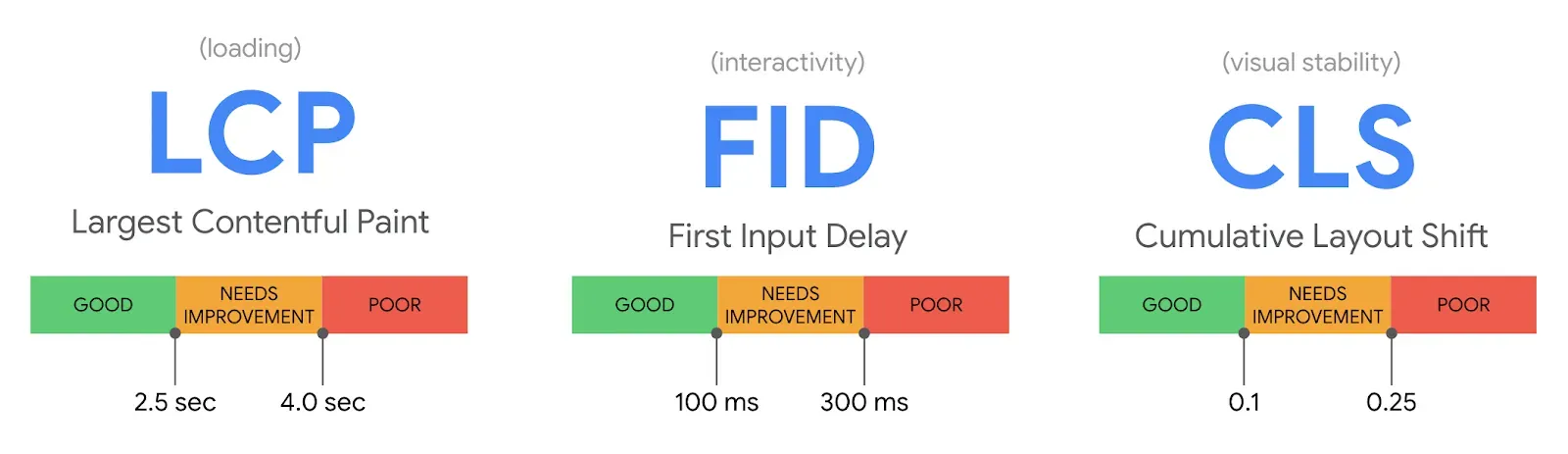
LCP measures how long it takes for the biggest visible element on your page (usually your hero image, main headline, or featured product photo) to fully appear on screen. Under 2.5 seconds is good. Between 2.5 and 4 seconds needs improvement. Over 4 seconds is poor.
This is the metric most directly tied to whether visitors stay or leave. It measures the moment your page goes from "blank screen" to "I can see the content." Every fraction of a second matters here. Research from Deloitte and Google found that improving mobile page speed by just 0.1 seconds increased retail conversion rates by 8.4 percent and average order values by 9.2 percent.
Bad LCP scores are usually caused by oversized images that haven't been compressed, slow web hosting with poor server response times, too many third-party scripts (analytics trackers, chat widgets, social media embeds) blocking the page from rendering, and render-blocking CSS and JavaScript files.
INP: Interaction to Next Paint (How Fast Your Site Responds)
INP measures how quickly your website visually responds after someone interacts with it: clicks a button, taps a menu, fills out a form, opens a dropdown, etc. It tracks every interaction throughout the entire visit and reports the worst one. Under 200 milliseconds is good. Between 200 and 500 milliseconds needs improvement. Over 500 milliseconds is poor.
INP replaced the older First Input Delay (FID) metric in March 2024 because FID only measured the first click. INP measures every interaction. This matters because your "Contact Us" form might respond instantly, but if your product filter takes two seconds to react, users feel the lag and so does Google. As an example, when redBus optimized their INP scores, they saw a 7 percent increase in sales. SpeedCurve's research found that conversion rates are roughly 10 percent higher at 100 milliseconds INP compared to 250 milliseconds: even though both technically pass Google's threshold.
Bad INP scores are usually caused by heavy JavaScript running in the background, third-party scripts (especially ad networks and chat widgets) blocking the main thread, and complex animations or effects that compete with user interactions for processing power.
CLS: Cumulative Layout Shift (How Stable Your Page Is)
CLS measures how much your page content unexpectedly moves around while loading. Have you ever tried to click a link on a website, only to have the page shift and you accidentally click an ad instead? That's a layout shift, and Google penalizes it. Under 0.1 is good. Between 0.1 and 0.25 needs improvement. Over 0.25 is poor.
Layout shifts destroy trust. When content jumps around, users feel like they're not in control. For e-commerce sites, layout shifts during checkout can cause accidental clicks, abandoned carts, and frustrated customers who don't come back. Yahoo! Japan fixed their CLS issues and saw a 98 percent reduction in poor-performing pages and a 15 percent uplift in page views per session.
Bad CLS scores are usually caused by images and ads without specified dimensions, web fonts that load late and cause text to reflow, dynamically injected content (cookie banners, newsletter popups, chat widgets) that pushes page elements around, and ads that resize after loading.
How Core Web Vitals Affect Your Google Rankings
Core Web Vitals are a confirmed Google ranking factor. Google has said so publicly and repeatedly. But they are not the only ranking factor. Content relevance, quality, authority, and backlinks still carry far more weight. Google's own John Mueller has been clear that relevance matters much more than speed alone.
So what role do Core Web Vitals actually play? They function as a tiebreaker. When two pages offer similarly relevant, high-quality content, the faster and more user-friendly page gets the edge. In competitive niches where many businesses are producing solid content, that edge can mean the difference between page one and page two.
The data backs this up. One analysis found that websites failing Core Web Vitals ranked 3.7 percentage points worse in visibility than passing sites. Pages ranking in position one are 10 percent more likely to pass Core Web Vitals than pages in position nine. These aren't dramatic swings, but in competitive local search where you're fighting four other plumbers or dentists or businesses for the top spots, they add up.
And there's a compounding indirect effect. Poor Core Web Vitals mean slow pages and slow pages mean higher bounce rates. These higher bounce rates signal to Google that users aren't finding what they need, which pushes your rankings down further. Improving your site speed doesn't just satisfy one ranking factor; it triggers a positive feedback loop across multiple signals Google cares about.
Google also uses your site's mobile performance for ranking, regardless of whether the searcher is on mobile or desktop. This is called mobile-first indexing. Your mobile Core Web Vitals scores are the ones that count. With mobile devices accounting for roughly 64 percent of all web traffic, optimizing for mobile speed isn't optional.
How to Check Your Core Web Vitals (Free, Five Minutes)
You don't need to be technical to check your Core Web Vitals scores. Here are three free tools, ranked by usefulness.
Google Search Console (Best Overall)
If you have Google Search Console set up for your website (and you should) navigate to Experience, then Core Web Vitals in the left sidebar. This shows you which of your pages are rated Good, Needs Improvement, or Poor, broken down by metric and by mobile versus desktop. This uses real data from actual visitors over the past 28 days and it's the same data Google uses for ranking decisions. If Search Console says you're passing, you're passing.
If you don't have Search Console set up, do it today. It's free. Go to search.google.com/search-console and follow the verification steps. Your web developer can help if needed.
Google PageSpeed Insights (Best for Specific Pages)
Go to pagespeed.web.dev and enter any URL. You'll get both "field data" (real user experience, if available) and "lab data" (simulated test). Focus on the field data section first, it's labeled "Discover what your real users are experiencing." The lab data from Lighthouse is useful for diagnosing specific issues, but field data is what Google actually uses for rankings.
Test your homepage, your most important product or service page, and your contact page. These are the pages that matter most for conversions.
Chrome DevTools Lighthouse (Best for Developers)
This is the tool your web developer should be using, but if you're tech savvy you can use it too. In Google Chrome, press F12, click the "Lighthouse" tab, and run a performance audit. It provides specific, actionable recommendations (like which images to compress, which scripts to defer, and which resources are blocking rendering).
You probably won't run this yourself, but mention it to your developer. Ask them to run a Lighthouse audit and share the results with you.
What to Tell Your Web Developer
You shouldn't need to understand server-side rendering or JavaScript bundle splitting to get your website performing well. But you should know which questions to ask and which answers should concern you.
The Conversation Starter
Send your developer this message: "Can you pull up our Core Web Vitals report in Google Search Console and share a screenshot? I'd like to understand where we stand on LCP, INP, and CLS, particularly on mobile."
If they don't know what Core Web Vitals are, that's a red flag.
Questions to Ask
Start with LCP. Ask what your score is on mobile. Anything over 2.5 seconds means your main content is loading too slowly. Common fixes include compressing and properly sizing images, using modern formats like WebP, implementing lazy loading for below-the-fold images, upgrading to faster hosting, and adding a CDN (Content Delivery Network) so your site loads from servers closer to your visitors.
Ask whether you're passing INP. Under 200 milliseconds is the target. Common fixes include reducing or deferring JavaScript, removing unnecessary third-party scripts, and optimizing event handlers on interactive elements.
Ask about your CLS score. Under 0.1 is the target. Common fixes include always setting explicit width and height dimensions on images and videos, preloading fonts, and avoiding injecting content above existing page elements.
Ask how many third-party scripts your site is loading. Every analytics tracker, chat widget, social media embed, and ad network script slows your site down. Each third-party script adds an average of 34 milliseconds to load time, and they compound. If your site loads 15 third-party scripts, that's potentially half a second of overhead before your actual content even starts loading. Ask which ones are essential and cut the rest.
Ask about your Time to First Byte (TTFB). This measures how fast your server responds. Under 200 milliseconds is ideal. If TTFB is slow, the problem is likely your hosting provider, not your website's code. No amount of image optimization will fix a slow server.
Red Flags
Watch out for a few specific responses from a developer or agency.
"Core Web Vitals don't really matter for small businesses." They do. The data is clear. "We'll get to performance optimization later." Performance should be built in from the start, not bolted on afterward. Retrofitting speed is always harder and more expensive. "Our Lighthouse score is 95." Lab scores and field scores are different things. A site can score 95 in a lab test but fail in the field because real users on real devices on real networks experience something very different. Always ask about field data from Search Console or Chrome User Experience Report (CrUX). "Let's add a performance plugin and call it done." Plugins help, but they can't fix fundamental architecture problems. If your site loads 4MB of unoptimized images and 20 render-blocking scripts, a caching plugin is putting a bandage on a broken leg.
Platform Matters: How Your CMS Affects Core Web Vitals
The platform your website is built on has a significant impact on your baseline Core Web Vitals performance.
According to the CWV Technology Report from mid-2025, Duda leads all platforms with 83.6 percent of sites passing Core Web Vitals. Shopify ranks second, which is impressive for an e-commerce platform given how resource-heavy online stores typically are. Squarespace ranks first for responsiveness (INP), with 95.8 percent of sites scoring good. Wix has improved dramatically, increasing mobile origins passing Core Web Vitals by over 250 percent year-over-year. WordPress lags at roughly 44 percent of sites passing on mobile, though this is largely a hosting and configuration issue, not a platform limitation.
If your business runs on WordPress, your Core Web Vitals depend heavily on three factors: your hosting provider, your theme, and your plugins. A well-configured WordPress site on quality managed hosting with a lightweight theme can score excellently. A WordPress site on cheap shared hosting with a bloated visual builder theme and 30 plugins will struggle.
There's also a third path that sidesteps the CMS debate entirely: building with modern JavaScript frameworks like Astro or Next.js. At Launch Turtle, this is our preferred approach. These frameworks generate lightweight, static or server-rendered pages with minimal client-side JavaScript, which is exactly what Core Web Vitals reward. Where a WordPress site might ship hundreds of kilobytes of unused CSS and JavaScript on every page load, an Astro site ships almost none by default. The performance ceiling is simply higher when you're not fighting a CMS layer to get there. It's not the right fit for every project, but for businesses that want to compete on speed, frameworks built for performance will always outperform platforms built for convenience.
The takeaway isn't that you should switch platforms. It's that your platform choice creates a starting line, and some platforms require more optimization effort than others to pass Core Web Vitals.
What to Do Next
If you've read this far, you understand more about Core Web Vitals than most business owner (and probably more than some web developers). Here's your action plan.
This week: check your Core Web Vitals. Use PageSpeed Insights to test your homepage and top three pages. Screenshot the results.
This month: share those results with your web developer or agency. Ask the questions outlined in the section above. If you don't have a developer, this is a good reason to find one who understands website performance optimization.
This quarter: set a goal to get all three Core Web Vitals into the green ("good") range on mobile. Prioritize LCP first since it's the metric most tied to business results and the one most sites struggle with. Then address CLS (often quick wins), then INP (usually requires JavaScript expertise).
Ongoing: monitor your Core Web Vitals in Google Search Console monthly. Performance can degrade over time as new content, plugins, or third-party scripts are added to your site. A quarterly performance audit should be part of your website maintenance routine.
Your website's speed isn't a technical detail to delegate and forget. It's a revenue lever. Every tenth of a second you shave off your load time is a measurable improvement in conversions, rankings, and customer satisfaction. In a world where more than half of all websites are failing Core Web Vitals, simply being fast is a competitive advantage.
The three-second window is ticking. Make sure your site is ready when customers arrive.
Need help diagnosing and improving your Core Web Vitals? Launch Turtle builds fast, accessible websites for small businesses and startups, with performance baked in from day one, not patched in later. Get in touch →
Works Cited
- Google. "Find Out How You Stack Up to New Industry Benchmarks for Mobile Page Speed." Think with Google, 2017.
- Google Developers. "Understanding Core Web Vitals and Google Search Results." Google Search Central, updated December 2025.
- web.dev. "The Business Impact of Core Web Vitals." Google, 2023.
- HTTP Archive. "2025 Web Almanac: Performance." 2025.
- Karel, Arjen. "How to Pass Core Web Vitals: Step by Step (2026)." CoreWebVitals.io, February 2026.
- Deloitte and Google. "Milliseconds Make Millions." Deloitte Digital, 2020.
- HubSpot. "How Page Load Time Affects Conversion Rates." HubSpot Research, 2022.
- SpeedCurve. "INP and Business Metrics." SpeedCurve Blog, 2024.
- Numen Technology. "Core Web Vitals 2025: Why INP Replaced FID as a Google Ranking Factor." November 2025.
- Search Engine Journal. "2025 Core Web Vitals Challenge: WordPress Versus Everyone." August 2025.
- web.dev. "How the Core Web Vitals Metrics Thresholds Were Defined." Updated May 2025.
- Hostingstep. "25+ Core Web Vitals Study and Statistics 2025." December 2025.
- Blue Triangle. "Core Web Vitals Impact Your Online Business: An LCP Case Study." 2024.
- Queue-it. "93 Powerful Ecommerce Site Speed Statistics for 2026." January 2026.
- MonsterInsights. "What Are Core Web Vitals & How to Improve Them for Better Rankings." December 2025.
- Weblogic. "What Are Core Web Vitals? (And Why They Matter in 2025)." October 2025.
Weekly Insights
Get actionable web development tips that actually work. No fluff, just proven strategies.
Join 5,000+ developers and business owners worldwide
Weekly insights • No spam • Unsubscribe anytime

Jackson White
Content Creator
Jackson is the founder and lead developer at Launch Turtle, bringing over 4 years of technical expertise to help small and mid-sized businesses establish powerful online presences. Let's Launch!